%20-%20new%20-%208-3-2026.png?width=450&height=80&name=Horizontal%20logo%20(450%20x%2080%20px)%20-%20new%20-%208-3-2026.png)

Trendz3: The Free IT & Tech Newsletter Designed Just for Small Businesses of Northwest Arkansas
%20(1).webp?width=2000&height=1000&name=Blog%20post%20headers%20(3)%20(1).webp)
Trendz3: The Free IT & Tech Newsletter Designed Just for Small Businesses of Northwest Arkansas
Note: This is a web version of our newsletter. You can subscribe here for free.
January 2026
Hi Friend,
I hope you're already finding your stride in 2026!
You know, as I glanced over the content in this month's newsletter, I thought to myself, "Wow, this really is crucial info for our clients and subscribers to see!" I hope you'll take just a few minutes each month to read and heed the news and recommendations we pass along in this newsletter. It's empowering stuff!
This month's trends: taxes and IT, the rising cost of hardware, and dangerous URLs.
Thanks for being a trusted partner and a faithful reader.
Sincerely,
Rob Brothers
Founding Partner
TekTrendz

Trend1 — Tax season (pee-yew) puts the spotlight on IT...

The tax man cometh. And while it's hard to put a positive spin on that, there are some crucial IT and cybersecurity items to be aware of this tax season. And...it's not all bad news, either. Below is a quick "IT and tax season" primer...
Note: Naturally, talk to your CPA and/or IT provider (that's us) to understand how these points apply specifically to your unique business.
- Maybe IRS tax code makes you nauseous, but at least Section 179 offers welcome news. Section 179 lets businesses deduct the full cost of qualifying IT equipment and software in the purchase year — rather than depreciating it over several years. Did you upgrade tech/software last year? You could potentially deduct the entire cost for a lower tax bill. Yeehaw.
- Likewise, ongoing IT support, cybersecurity services, monitoring, backups, and similar monthly IT expenses are generally considered ordinary business expenses — which means they’re often fully deductible. The IT support you receive from us? Very likely deductible.
- It's a new year and, thus, a clean slate for recording IT expenses. If you're concerned you left IT-related tax deductions on the table last year, now's the time to put structure in place to make sure it doesn't happen this year.
- The IRS never initiates contact by email, text message, or social media. If a message claims to be from the IRS and asks you to click a link, it's almost certainly a scam. Be especially wary of urgent or scary messages: "Immediate action required to avoid IRS penalties."
- Be on the lookout for fake CPA, payroll, and bookkeeping emails. Question messages (especially payment requests) from even your most trusted partners, because it may be an imposter.
- W2 theft is a common threat for small businesses. Attackers sometimes impersonate owners/executives and request payroll/W2 data. Never send W2s via email without verification and encryption.
Trend2 — RAM is getting scarce out there (and why that's a big deal for your IT)
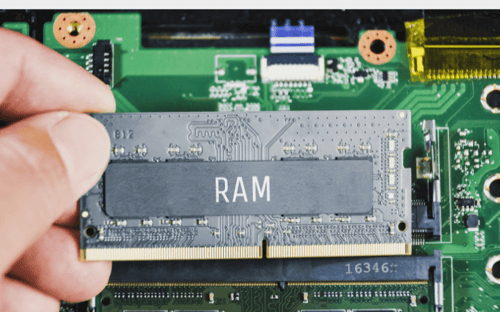
It seems all that ChatGPTing of recipes, remedies, and road trips has caught up to the RAM market — with major implications for the cost of tech in the new year.
In a nutshell, RAM-hungry AI data centers, that in many ways need more memory than manufacturers can produce, are gobbling up all the RAM they can find — and this has created a memory shortage for PC and other hardware makers. Not surprisingly, this limited-supply, hyper-demand situation will create what PCWorld is calling an "apocalyptic rise in (RAM) prices" for 2026 and, in turn...
...costlier technology for you, me, and our businesses.
Indeed, industry onlookers expect PC makers to raise prices somewhere between 15-20% over the coming year. Ouch! (Wish I had better news to start the year.)
Suggestions:
- Be proactive and deliberate about budgeting PC and hardware purchases in the new year...and account early for the higher costs coming down the chute
- PCs must be replaced — that's inevitable. With hardware getting more expensive, now's the time, if you haven't already, to implement a phased rollout of new PCs — so you don't have to replace all or most of your organization's old PCs at once.
- Good rule of thumb: Since the lifecycle for most desktops and laptops is 4-5 years, set a goal of replacing between 20-25% of your units each and every year. A little pain now > lots of pain later.
- Work directly with us — and we can help you schedule and even save on hardware purchases as the RAM shortage drags on
Trend3 — Why mistyping that web address has become a risky affair...

Back in my day (as I rub my lower back), you could type the wrong address into the URL bar and, well, nothing much happened. Now, however, mistyping a web address — gogle.com vs google.com, for example — can be downright risky.
The culprit? Parked domains, or domains that are registered (i.e., someone purchased the URL) but aren't actively linked to a website. In a nutshell, bad actors purchase commonly mistyped domains (e.g., "gogle") and use them to redirect visitors to websites with scams, malware, and the like.
Alarmingly, most parked domains are now pushing scams, malware. It's a big deal, because there's no clicking or opening involved. Just innocently mistyping.
Some basic steps to protect yourself (and to share with your team):
- Pause...and double-check that URL before hitting go. Better still, though not foolproof, access all your websites through a trusted search engine
- Bookmark websites you visit regularly. Start with tektrendz.com ; )
- Install and regularly update top-tier antivirus protection (we can help)
- Don't go long periods without updating browsers and devices
It's never been more important to, literally, mind your P's and Q's when navigating the web. And just holler at us if you have concerns about your cybersecurity.

Cool calculator (a cool-culator): The cost of IT downtime to your business?
If your business couldn't access its IT systems for one or a few days, how much would that cost you in both dollars and recovery time? Whether you're doing some serious budgeting, or you're just curious, it's nice to have a reliable tool for estimating the cost of an IT outage.
This calculator from Datto is mighty helpful. Click below to run an estimate on your business, or scroll to see an estimate for an "average" business.
Run Your Own Estimate
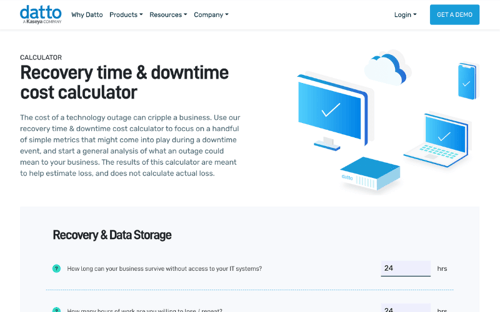
To illustrate, imagine an "average" business as follows:
- Average annual revenue of $5 million
- 25 employees each earning $50K annually, with an annual overhead cost of $20K per employee
- 1000 GB of data on critical business systems, backed up every 24 hours to the cloud at a download speed of 100 Mbps
- The business can survive 24 hours without access to IT systems; can sustain a "work/data loss" of 24 hours
- 60 minutes pass before troubleshooting starts
The downtime cost to this hypothetical business would be:
23 hours, 45 minutes of downtime, at a cost of $71,600
If, alternatively, we assume this business doesn't back up its data at all, the calculator estimates a "possible business closure" for the company.
Bottom line: Your business runs on IT. Guard it.

Articles We're Reading...
Here's four articles we've read recently with important implications for small business — and their technology, productivity, and/or cybersecurity.
- Cyberguy.com: This is how your email gets into the wrong hands
- Cyber Defense Magazine: The State Of SMB Cybersecurity In 2026: Key Trends And Predictions
- Axios NW Arkansas: Arkansas is a data center growth spot
- U.S. Chamber of Commerce: How AI Is Driving ‘Growth Engines’ for Small Businesses in 2026
Whatcha' Waitin' For? Subscribe to Trendz3 Today
Trendz³ is a free, monthly email newsletter from TekTrendz, created exclusively for small businesses of Northwest Arkansas. Once a month, the Trendz³ newsletter will provide you with a quick rundown of the three most pressing trends in technology, cybersecurity, and IT — that you really need to know. We'll also share helpful resources and news along the way.
It's the IT newsletter designed for you. Click below to sign up today. It's free.
%20(1).webp?width=2000&height=500&name=The%20facts%20about%20cyberattacks%20(8)%20(1).webp)
.webp?height=200&name=Trendz3%20December%202025%20(1).webp)